


Explore ClubOS
Every club job deserves a simpler way.
Start with the problem your volunteers know best. Discover how connected club tools make the next step easier for everyone.
Book a walkthrough →Choose the job you want to make easier.
Team selection
Know who can play. Prepare the squad. Publish when you’re ready.
Explore feature
Payments
Keep charges, online payments and outstanding balances connected.
Explore feature
Communications
Keep players, parents and volunteers informed through club updates.
Explore feature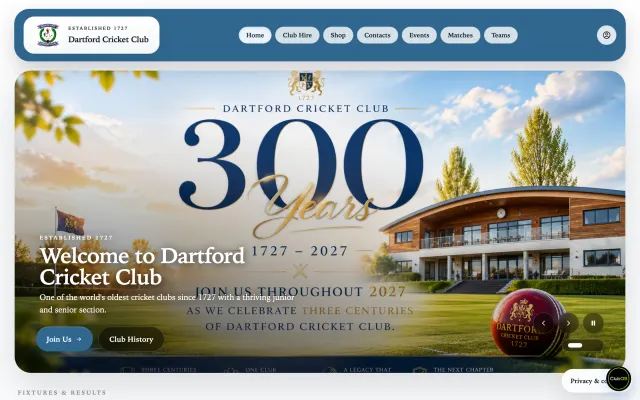
Website & club growth
Give your news, events, social updates and local sponsors a home.
Explore feature

Multi-sport clubs
Bring different teams and sports into one shared club platform.
Explore feature
Onboarding & support
Real people to help your club admin, from onboarding through your first full season.
Explore featureBefore you decide
FAQ
From picking a team to paying a match fee. Here’s how ClubOS helps admins, players and families.
Book a walkthrough →For admins and captains
How do I select a team with Club AI?
Tell Club AI the team and match, then paste or say the players’ names. It matches club members and prepares a squad with the reviewed fee choices. Review and approve the draft to save it privately. When you’re ready, ask it to publish and approve that separate action. Publishing can allocate match fees and notify players; saving a draft stays private.
Explore team selection →Does ClubOS calculate senior and junior match fees?
Yes. Once your club’s fee categories and match rates are configured, ClubOS applies each player’s Senior, Junior or No fee category to the match. You review the amounts and any fixture-specific exceptions before publishing. Allocate fees with publication, or publish the team first and allocate the saved fees later. Missing rates need review rather than a guessed charge.
Explore match fees →Can I assign captains, wicketkeepers and match duties?
Yes. Use the selection board to set captain and vice-captain, sport-specific playing roles such as wicketkeeper, and duties such as umpire or scorer. Club AI can help with captain choices; playing roles and duties are assigned on the board. Publish to make the assignments visible. A duty alone does not create a player match fee or a selection notification, and role-only edits do not resend selection notices.
See the selection workflow →How are players notified when I publish a team?
Publication sends selection notices to selected players and can also notify available players who were not picked. Email and in-app alerts follow the club’s notification settings; browser push needs permission, and phone alerts need an enabled club rollout and compatible app. Pro clubs can add WhatsApp for connected, consenting members with message credits. Telegram supports configured group announcements, rather than personal selection or payment notices.
Explore club communications →Are WhatsApp and Telegram included in every plan?
WhatsApp is exclusive to Pro and needs member connection, consent and available message credits. Telegram group announcements can be configured on Standard or Pro. Email and in-app updates remain part of the connected club workflow. Each channel has its own setup and audience rules, so enabling a channel does not send every kind of notice through it.
Compare plans and channels →For players and families
How do I set my availability with Club AI?
Sign in and say or type, ‘Mark me available for Saturday’ or ‘I can’t play this weekend.’ Club AI finds the relevant fixtures and records your response, asking for clarification when needed. It confirms whose availability changed and for which match. You can also use Fixtures directly. Availability tells the captain you can play; the captain still chooses the team.
See how availability works →I’ve been selected. How do I confirm I can play?
Open the published match in Fixtures and confirm or decline your place. You can also ask Club AI, ‘Confirm I’ll play in Saturday’s match,’ or explain that you cannot play. Add an optional note for the captain. This confirmation is separate from your earlier availability response, and it does not pay or change your match fee.
Explore the player journey →How do I pay my match fee?
Ask Club AI, ‘What do I still owe?’ It can explain your outstanding balance and point you to Payments. Review the assigned charge and choose Pay now to complete Stripe checkout yourself. Where your club offers match-fee shop checkout, you can combine eligible fees in one basket. Club AI never pays on your behalf, and an unallocated fee is not yet payable.
Explore member payments →Can parents manage availability and fees for juniors?
Yes. Managing parents and guardians can use authorised linked junior profiles for availability, selection responses and payments. Tell Club AI the junior’s name when you act for them, for example, ‘Mark Alex available for Saturday.’ It checks the family link and asks you to clarify ambiguous names. Your own profile and each junior’s records stay separate.
Explore family-friendly club tools →About ClubOS
Does Club AI speak only English?
No. Club AI supports conversations in multiple languages. Ask it to use your preferred language; live two-way voice is available with Pro. Understanding can vary by language, accent and background noise, so we can confirm your club’s main languages during onboarding. Typed chat remains available when you prefer it.
Explore Club AI →How secure is my club’s data?
ClubOS runs on managed AWS infrastructure with encrypted connections, club-scoped access, role-based permissions, audit logging, monitoring and backups. Club AI follows the same access boundaries, so members cannot use it to reach admin-only records. Stripe handles card payments. Our privacy notice and Data Processing Agreement explain the protections and responsibilities in detail.
Read about security and payments →Is my club’s data used to train AI models?
ClubOS does not train AI models on your club records. Typed Club AI uses Amazon Bedrock, which does not use prompts and replies to train its base models. Optional voice uses OpenAI’s API, which excludes model training by default unless an organisation explicitly opts in. Relevant authorised information is processed to answer your request, and provider retention policies still apply. You control your AI and voice privacy choices.
Read the AI privacy details →Where is our data hosted, and what about GDPR?
Core club records are hosted in AWS’s London region. ClubOS provides a privacy notice, Data Processing Agreement and processes for member data rights to support your club’s UK GDPR responsibilities. Some service providers, including optional voice, may process information outside the UK under the safeguards described in those documents. We can discuss any specific residency requirements during onboarding.
Read the Data Processing Agreement →Can ClubOS manage different sports?
Yes. ClubOS connects memberships, teams, fixtures, availability, fees and club updates across supported sports. Sport-specific roles and optional integrations fit each club’s setup. Tell us which sports you run and we’ll walk through the relevant workflows with you.
Explore multi-sport clubs →Can we move from spreadsheets or another club platform?
Yes. We help you plan the move during onboarding. Share how you manage members, teams and fees today, and we’ll agree what can be transferred from your exports. Member data is validated and reviewed before activation invitations are sent. The available export, data quality and club setup affect the work involved; a walkthrough is the best place to confirm your club’s move.
Explore supported onboarding →Can we keep our club branding and website address?
Your ClubOS website can use your club’s logo, colours and identity. An existing custom domain can be connected with support once ownership, DNS and HTTPS are verified. We agree the domain setup and handover with you before changing the public address. See the real club website example, or discuss your current website during a walkthrough.
Explore your club website →Is onboarding free, and which plan includes Club AI?
There is no setup fee. We help with onboarding and provide complimentary administrator support through your first full season. Standard covers the connected club essentials; Pro adds advanced Club AI workflows, live voice and WhatsApp. ClubOS takes no commission on member payments; payment-provider fees still apply. Compare the plans for your country or book a walkthrough to find the right fit.
See pricing and what’s included →